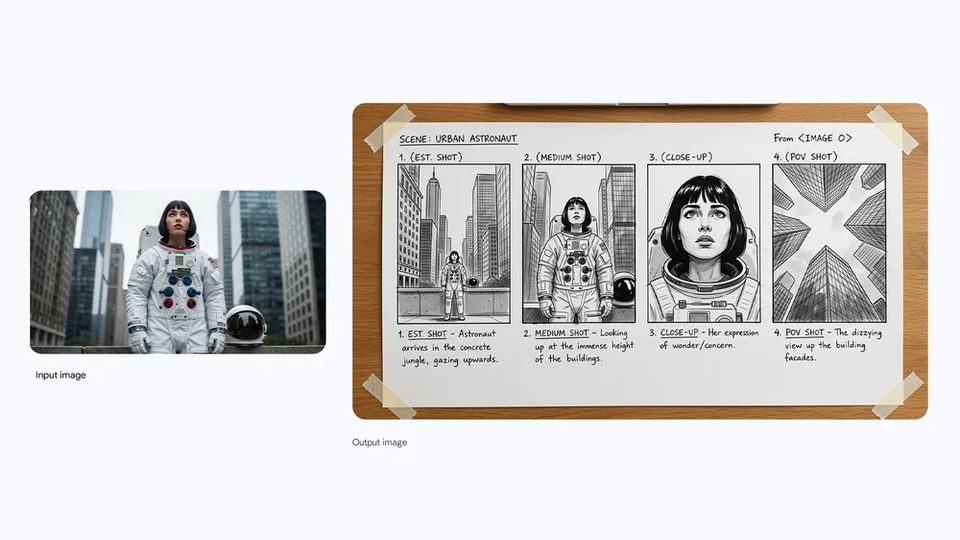
Nano Banana Pro storyboard from an urban astronaut still

I opened gemini.google.com, waited for the dark composer, and mapped the live picker — Flash-Lite, 3.6 Flash, 3.1 Pro — plus images, video, and Spark as the product names them today. This is a field guide, not a login.
What it is
The tab title said Google Gemini. The wordmark next to the four-point sparkle said Gemini. The headline in the canvas was the personal-assistant line, and the composer asked me to type a prompt. Under it sat four chips I could tap without signing in: Write, Plan, Explore, Learn. That is the product as a person meets it — a chat that already hints at jobs, not a documentation dump.
I treat Gemini as Google’s consumer assistant sitting on a family of models. The unsigned picker named 3.5 Flash-Lite, 3.6 Flash, and 3.1 Pro. Sign-in promised the rest of the lineup. On Google’s own Gemini posts I also saw Gemini 3.7 Flash as the coding and agent workhorse, Gemini Spark as the 24/7 agent for paid plans, Nano Banana 2 for stills, and Gemini Omni 1.1 Flash for clips. I did not invent extra version numbers to fill a grid.
The official explainer is blunt about limits: answers can be wrong, biased, or oddly personal. The footer on the live app repeats that Gemini is an AI and can make mistakes. I write the same way. If a citation looks too neat, I open the source. If a picture looks perfect, I remember the visible sparkle watermark on many free-tier stills and the hidden mark Google calls out for provenance.
This site is my independent overview. For the composer, plans, and downloads, use the official Gemini website. I do not host accounts here. Primary buttons on this page open a local next-step dialog so you are not bounced into a signup you did not ask this overview to start.
I am not Google, and this host is not Gemini’s product surface. Facts below come from the app I opened, gemini.google overview pages, and Google’s public Gemini posts from this visit.
What it can do
Image cards are official Nano Banana examples from Google’s own post. Text and code cards are how I actually use Write, Learn, and a debug pass — not stock art pretending to be a picture model.
Nano Banana Pro storyboard from an urban astronaut still
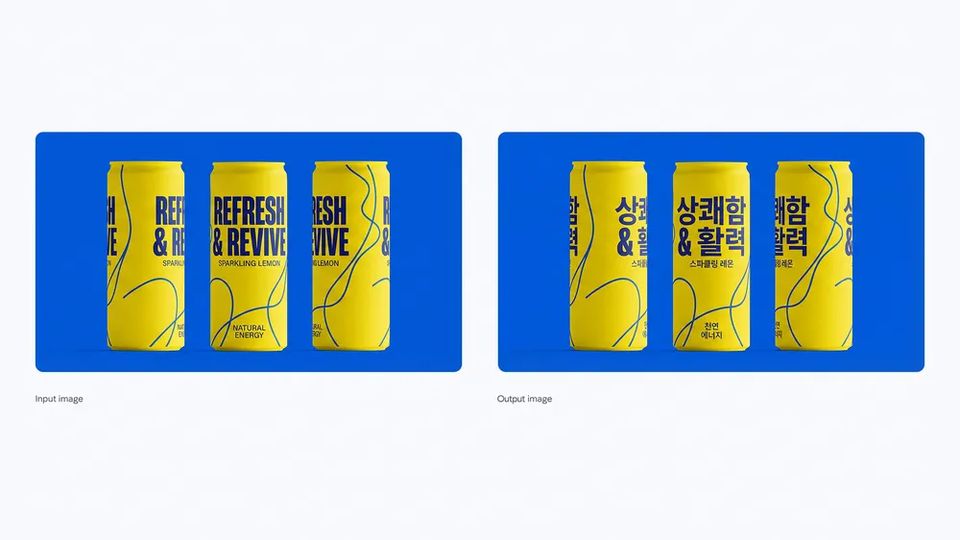
Nano Banana Pro keeping pack design while shifting can copy into Korean
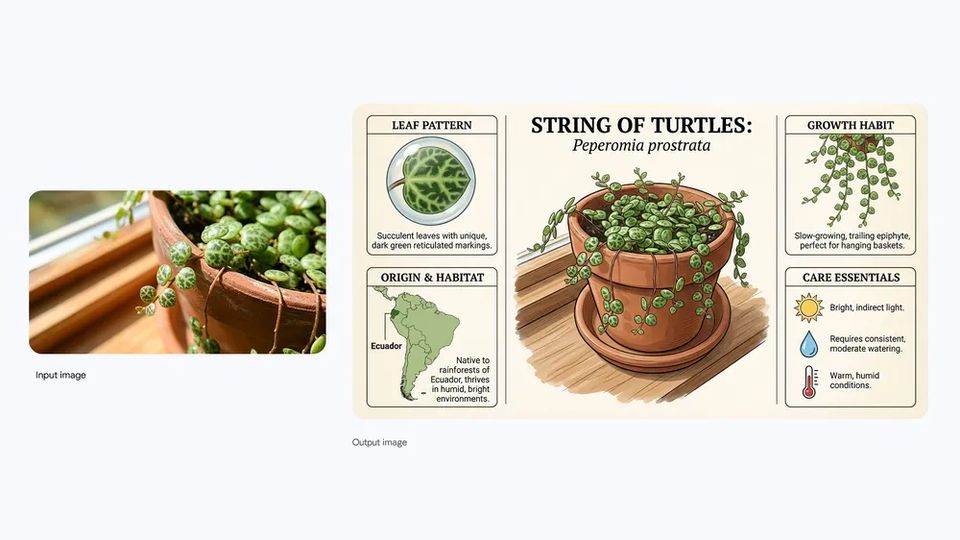
Nano Banana Pro turning a windowsill plant photo into a care card
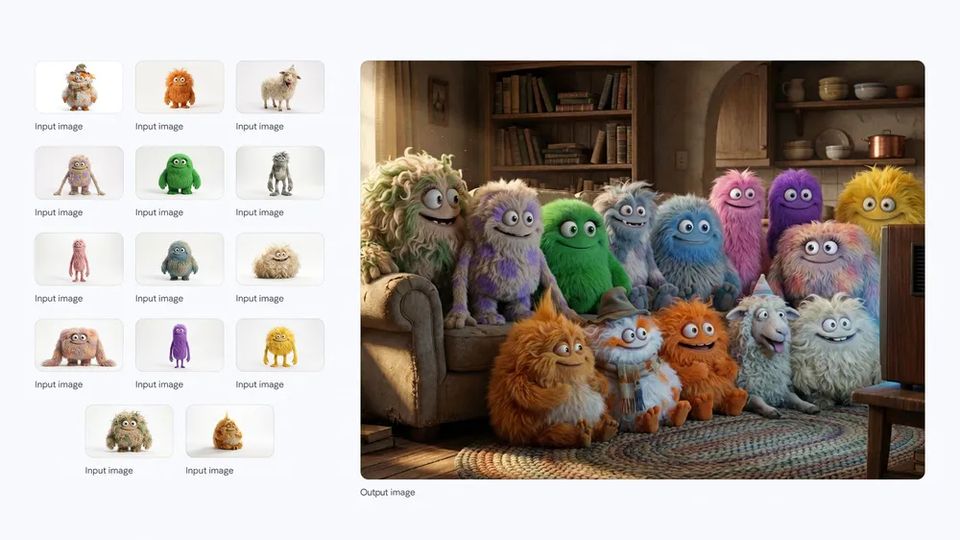
Nano Banana Pro seating fourteen characters on one sofa

Nano Banana Pro pop-art weather card grounded in live facts

Nano Banana Pro carving a tongue-twister into a woodpile
Write chip: a recap I would still send as myself
Learn chip: a notebook map from a syllabus I actually uploaded
# What I pasted after 3.6 Flash asked for the failing test
def parse_range(raw: str) -> tuple[int, int]:
    left, right = raw.split("-", 1)
    start, end = int(left), int(right)
    if end < start:
        raise ValueError("end before start")
    return start, end

# It caught that I had been splitting on en-dash from a docs paste.
# I still ran pytest myself.
3.6 Flash helping me spot a dash in a failing parser — I still ran the tests
Jobs
The chips and tools on the live app already name the work: write, plan, explore, learn, stills, video, voice. I turned the ones I could confirm into pages, each with a short note on why I would bother.
I use Write when a recap has to leave my desk the same afternoon.
Student hub and mobile notebooks built from files you actually uploaded.
Spark is the agent tab: mail, status docs, local files on Mac when the plan includes it.
Create images: combine photos, restyle a selfie, keep a product pack readable.
Omni: talk a clip into existence, extend the scene, optional avatar. Paid, 18+.
Mic on the composer, Gemini Live, and dictation on the Mac app.
Lineup
Unsigned I only saw three in the picker. The others are named on Google’s Gemini pages I opened in the same pass. Each card goes to a short note, not a fake benchmark table.
Fastest replies in the live picker I opened. Everyday drafts when latency matters more than a long think.
All-around help in the Gemini app: documents, Canvas prototypes, and the daily path I actually pick.
Advanced reasoning in the model menu. Higher limits sit on Google AI Pro and Ultra.
Workhorse Google posted for coding and agents; Spark in the app uses it for Pro and Ultra in supported countries.
Specialized reasoning mode in the prompt bar for Ultra. Minutes, not a snappy chat turn.
Create images in the tools menu: Fast, Thinking, or Pro. Paid tiers can redo with Nano Banana Pro.
Video generation and editing in the app — about ten-second clips, native audio, scene extend. Replaces Veo there.
24/7 personal agent for Pro and Ultra: Workspace actions, files, and multi-step chores you still supervise.
These notes are mine. They are not official scores from Google, and they are not a substitute for the model menu in the app.
Tools
I did not invent a taxonomy. Write, Plan, Explore, Learn are chips. Create images and Create video are tools. Deep Research appears once you are signed in.
The Write chip on the homepage: emails, recaps, and copy you will still edit.
The Plan chip: outlines, calendars, and the sequence of a job before you start it.
The Explore chip plus Deep Research when you are signed in and the tool is offered.
The Learn chip and the student hub: notebooks from your own syllabus, not a mystery textbook.
Nano Banana 2 in the tools menu: generate and edit stills, including text inside the frame.
Create video in the tools menu, powered in the product by Gemini Omni.
Why I keep a tab open
Flash-Lite versus 3.6 Flash versus 3.1 Pro is an honest fork. I do not have to pretend every question deserves a long reasoner. I also do not have to pretend the fast lane never flubs a citation.
Write, Plan, Explore, Learn are not buried. If I am stuck choosing a “persona,” the chips already suggest a posture. I still rewrite the output so it sounds like me.
Nano Banana 2 is not a one-shot poster mill in the copy Google published: change lighting, restyle, keep text, combine references. I care more about the edit loop than a pretty first frame.
Spark is framed as work on your behalf under your direction — Workspace, files, status docs. That is a different promise from a clever paragraph. I still approve the calendar change.
Who it fits
If Gmail, Docs, Drive, and Calendar are the day, Gemini’s integrations and Spark are the reason to try the native assistant instead of a disconnected chat.
The student hub and study notebooks only matter if you feed them your materials. A generic “explain photosynthesis” tab is not the feature Google is stressing now.
Nano Banana 2 and Omni are the creative pair. Omni needs a paid plan and adult access. I would not promise cinema length; Google’s own Omni page talks about ten-second clips and extend.
3.7 Flash is the workhorse Google described for coding agents, Antigravity, AI Studio, and enterprise consoles. This overview is not an SDK. It is a map of names you will see in the consumer picker versus the blog.
Questions
Gemini is Google’s personal assistant in the browser and on phones. The live homepage I landed on after gemini.google.com redirected to the official Gemini website greets you as a chat: Write, Plan, Explore, Learn, plus a tools menu for files, images, and video once you sign in. It is a multimodal interface — text, pictures, voice, and more — not a single frozen model name. This page is my independent notes. It is not Google’s product site.
The product I opened resolves at the official Gemini website (gemini.google.com, then /app). Release notes and explainer pages live on gemini.google. For accounts, plans, and the composer itself, that is the host to use. Primary buttons on this overview open a local next-step dialog; they do not log you into Google.
Unsigned, the picker I saw listed 3.5 Flash-Lite (fastest), 3.6 Flash (all-around), and 3.1 Pro (advanced reasoning), plus a prompt to sign in for the rest. I start on Flash-Lite for notes, move to 3.6 Flash when a document pile shows up, and only open 3.1 Pro when the question is genuinely gnarly. Gemini 3.7 Flash showed up on Google’s blog as the coding/agent workhorse and as the engine under Spark for paid plans. Deep Think is an Ultra mode, not a casual default.
Yes, as products in the app I opened. Create images is Nano Banana 2 (Fast / Thinking / Pro; paid users can redo with Nano Banana Pro). Create video is Gemini Omni 1.1 Flash: roughly ten-second clips, native audio, scene extend, optional avatar, and it is positioned as the replacement for Veo inside the Gemini app. Both sit behind sign-in and plans. Stills on this page are official Nano Banana examples I saved locally. I did not get Omni sample clips downloaded, so there is no video row in the gallery.
The Gemini app is the chat surface. Google also folds Gemini into Workspace, Search, Android, the Gemini API, and enterprise consoles. I am writing about the consumer app I opened and the models named there or on Google’s own Gemini posts. I am not pretending this overview is a Cloud pricing sheet or a Gmail help center.
No. This is an independent overview. Product facts come from pages I opened on gemini.google.com and gemini.google, plus Google’s public Gemini posts. For the assistant itself, use the official Gemini website. Primary buttons here open a local dialog. They do not create a Google login.
Five reader impressions of this overview, not official product reviews.
Flash-Lite is what I leave selected for meeting notes. When a paragraph needs a second pass I switch to 3.6 Flash. I still cut the hedging before I hit send.
Elena V. · 5 of 5
Nano Banana 2 kept Korean on the can without wrecking the yellow. Omni is gated on my plan, so I have not judged the clips myself.
Marcus D. · 4 of 5
The study notebook from a messy syllabus PDF was the first time I trusted Learn. I still checked Klein. The map was the win, not the final exam.
Priya N. · 5 of 5
Spark drafted the status doc from three Drive files. I rejected one calendar move. That pause is why I keep it on Ultra, not because it sounds clever.
Jonah K. · 5 of 5
3.1 Pro helped me unpack a dense PDF. It also invented a citation I had to delete. Gemini says it can be wrong. I treat that as an operating rule.
Hana S. · 4 of 5
This page stays a map. The chat, the plans, and the tools live on Google’s host.